Google Home devices’ mystery USB port
Background
When the Google Home first came out, people quickly noticed there was a micro USB port underneath the speaker cover:
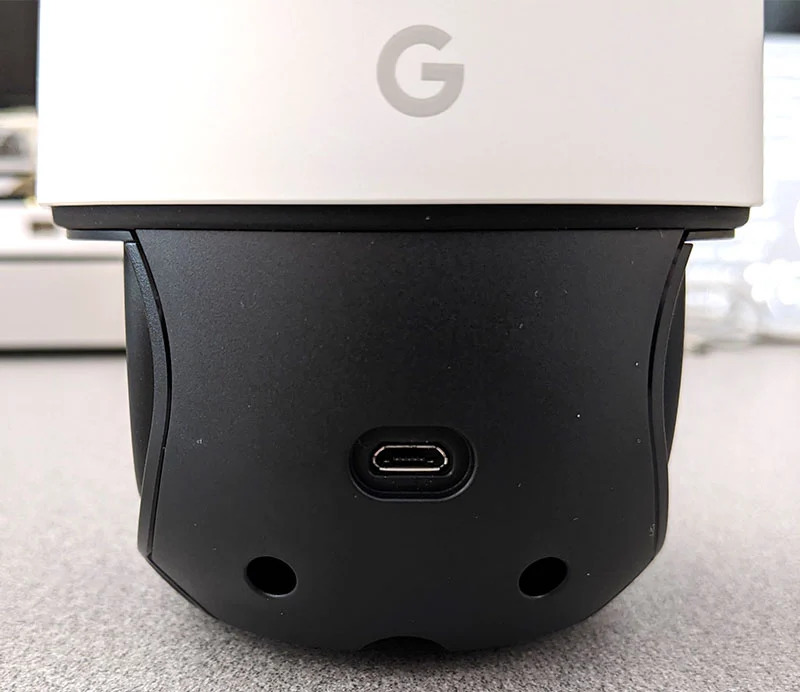
This USB port isn’t documented anywhere, but if you search around you’ll find plenty of forum posts where people have guessed what it was for, but none so far have figured out how to actually use it.
Enumeration
The tricky thing about accessing the USB port on these devices is that they don’t typically actually do anything (ie enumerate) during regular use. Each Google device (Chromecast, Google Home, Google Home Mini) has a special sequence of how to get into this mode where the USB connection will be established.
| Device | Button sequence |
|---|---|
| Chromecast | Hold reset button while connecting USB cable |
| Google Home Mini | Hold reset button while connecting USB |
| Google Home | Hold mute button while connecting power |
For each device, you’ll see a message like this in your dmesg log:
[Thu Jul 13 12:19:23 2023] usb 1-4.4.4: new high-speed USB device number 12 using xhci_hcd
[Thu Jul 13 12:19:24 2023] usb 1-4.4.4: New USB device found, idVendor=1286, idProduct=8174, bcdDevice= 0.02
[Thu Jul 13 12:19:24 2023] usb 1-4.4.4: New USB device strings: Mfr=1, Product=2, SerialNumber=3
[Thu Jul 13 12:19:24 2023] usb 1-4.4.4: Product: BG2CD S/N:12345678A
[Thu Jul 13 12:19:24 2023] usb 1-4.4.4: Manufacturer: Marvell
[Thu Jul 13 12:19:24 2023] usb 1-4.4.4: SerialNumber: S/N:12345678A
The “BG2CD” string is the model name for the Marvel Armada 1500 processor unit (source), the same one used in the original Chromecast, and the Home Mini.
The problem is that documentation on this unit is relatively hard to find. All I could find was the product brief; no datasheet was available.
By attaching lsusb to watch, I could print the full device output before it disconnected:
Bus 001 Device 016: ID 1286:8174 Marvell Semiconductor, Inc. BG2CD S/N:12345678A
Device Descriptor:
  bLength                18
  bDescriptorType         1
  bcdUSB               2.00
  bDeviceClass          255 Vendor Specific Class
  bDeviceSubClass       255 Vendor Specific Subclass
  bDeviceProtocol       255 Vendor Specific Protocol
  bMaxPacketSize0        64
  idVendor           0x1286 Marvell Semiconductor, Inc.
  idProduct          0x8174
  bcdDevice            0.02
  iManufacturer           1 Marvell
  iProduct                2 BG2CD S/N:12345678A
  iSerial                 3 S/N:12345678A
  bNumConfigurations      1
  Configuration Descriptor:
    bLength                 9
    bDescriptorType         2
    wTotalLength       0x0020
    bNumInterfaces          1
    bConfigurationValue     1
    iConfiguration          0
    bmAttributes         0x80
      (Bus Powered)
    MaxPower              500mA
    Interface Descriptor:
      bLength                 9
      bDescriptorType         4
      bInterfaceNumber        0
      bAlternateSetting       0
      bNumEndpoints           2
      bInterfaceClass       255 Vendor Specific Class
      bInterfaceSubClass    255 Vendor Specific Subclass
      bInterfaceProtocol    255 Vendor Specific Protocol
      iInterface              4
      Endpoint Descriptor:
        bLength                 7
        bDescriptorType         5
        bEndpointAddress     0x81  EP 1 IN
        bmAttributes            2
          Transfer Type            Bulk
          Synch Type               None
          Usage Type               Data
        wMaxPacketSize     0x0200  1x 512 bytes
        bInterval               0
      Endpoint Descriptor:
        bLength                 7
        bDescriptorType         5
        bEndpointAddress     0x01  EP 1 OUT
        bmAttributes            2
          Transfer Type            Bulk
          Synch Type               None
          Usage Type               Data
        wMaxPacketSize     0x0200  1x 512 bytes
        bInterval               0
This still leaves us with more questions than answers though.
Guessing
My first guess was that maybe the device momentarily was connecting to DFU mode. I tried running dfu-util --list while it was connected, but that didn’t show any devices.
I then tried to see if the device was sending any special USB packets when it was connecting.

Sadly, only the standard device enumeration sequence was there.
Leave a comment