Learning SQL with Call of Duty
Context
I was playing the Call of Duty Black Ops 6 campaign the other day and in one of the missions, the team sneaks into a campaign fundraiser event. This event, like most fundraisers, had a silent auction, and in an attempt to learn more about some of the guests (I’m being intentionally vague here so I don’t spoil the plot), the character goes over to the computer terminal where the auction information is available.
This is the screenshot from the game:
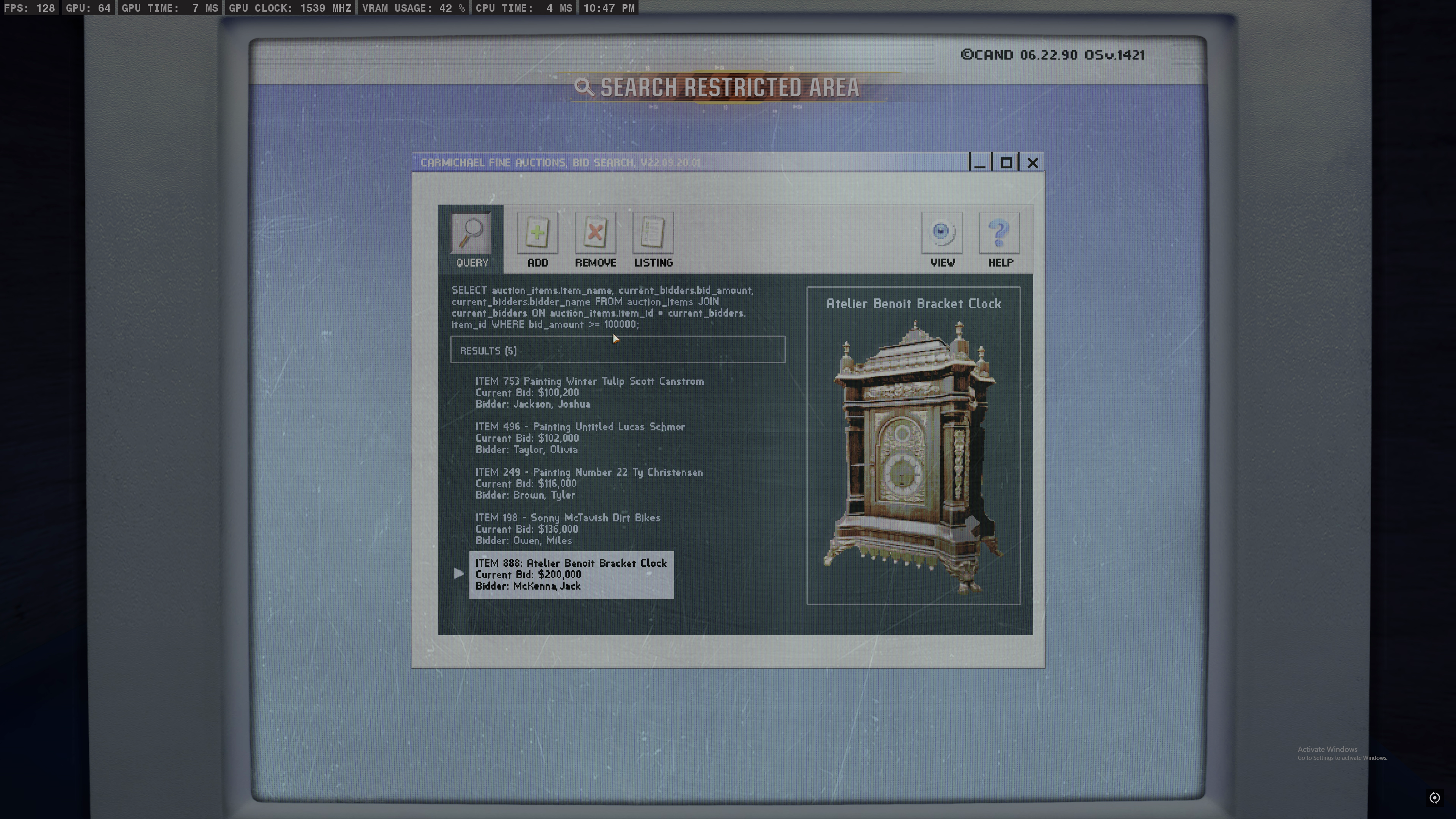
You’ll notice right away there’s some SQL being used – a query, and the result of it.
SELECT auction_items.item_name, current_bidders.bid_amount,
current_bidders.bidder_name FROM auction_items JOIN
current_bidders ON auction_items.item_id = current_bidders.item_id
WHERE bid_amount >= 100000;
This query:
- performs an inner join on two tables:
auction_itemsandcurrent_bidders - Uses the
item_idfield to do a match - Filters for bids greater than $100,000.
In plain English: Who bid more than $100k, and what did they bid on?
Experiment
Let’s reproduce this exact query on our own.
Start by creating our own database, adding two tables to that database.
The auction_items database at a minimum needs at minimum, 2 columns/fields:
- an item ID
- an item name
To make things more realistic, we’ll add a field for starting_price, just like a real auction house would have.
Using the game screenshot we have enough to populate this database. The starting price amounts are left to the reader’s imagination.
Below is the final auction_items table, with one “filler” item added.
item_id, item_name, starting_price
1, "Signed World Series baseball", 95000
198, "Sonny McTavish Dirt Bikes", 100000
249, "Painting Number 22 Ty Christensen", 110000
496, "Painting Untitled Lucas Schmor", 100000
753, "Painting Winter Tulip Scott Canstrom", 100000
888, "Atelier Benoit Bracket Clock", 175000
–
Now for the current_bidders table.
This table needs 4 columns:
- bid id (duh)
- item id - which item the bid is for
- bidder name - who made the bid?
- bid amount ($)
Use the info in the screenshot to populate this table, and add one filler element at the beginning – you should end up with the below.
bid_id, item_id, bidder_name, bid_amount
1, 1, Alice Johnson, 95000
2, 753, Joshua Jackson, 100200
3, 496, Olivia Taylor, 102000
4, 249, Tyler Brown, 116000
5, 198, Miles Owen, 136000
6, 888, Jack McKenna, 200000
–
Cool, we have our data. The next step to being able to run a query on it is to convert our CSV data into an actual SQL database.
There’s different ways to do this, but I like using Pandas.
Here’s the code snippet to create the tables:
    import pandas as pd
    import sqlite3
    conn = sqlite3.connect('/home/blackops6_auction.db')
    cursor = conn.cursor()

    # Create auction_items table
    cursor.execute('''
        CREATE TABLE auction_items (
            item_id INTEGER PRIMARY KEY,
            item_name TEXT,
            starting_price INTEGER
        )
    ''')

    # Create current_bidders table
    cursor.execute('''
        CREATE TABLE current_bidders (
            bid_id INTEGER PRIMARY KEY,
            item_id INTEGER,
            bidder_name TEXT,
            bid_amount INTEGER,
            FOREIGN KEY (item_id) REFERENCES auction_items (item_id)
        )
    ''')
The only thing needing explanation here is that we’re setting up a foreign key in the current_bidders table to map to the auction_items table. This is required to be able to use the join later.
With the tables created, we now just have to populate them:
    with open("auction_items.csv", mode='r', encoding="utf-8") as csv_file_obj:
        auction_items_data = pd.read_csv(csv_file_obj).values.tolist()
        cursor.executemany('INSERT INTO auction_items VALUES (?, ?, ?)', auction_items_data)

    with open("current_bidders.csv", mode='r', encoding="utf-8") as csv_file_obj:
        current_bidders_data = pd.read_csv(csv_file_obj).values.tolist()
        cursor.executemany('INSERT INTO current_bidders VALUES (?, ?, ?, ?)', current_bidders_data)

    # Commit and close connection
    conn.commit()
    conn.close()
After running this script you should have a db file created.
Next, install DB Browser for SQLite - a free open source program for viewing and interacting with databases.
Open the database file with the database viewer program so you can verify the structure.
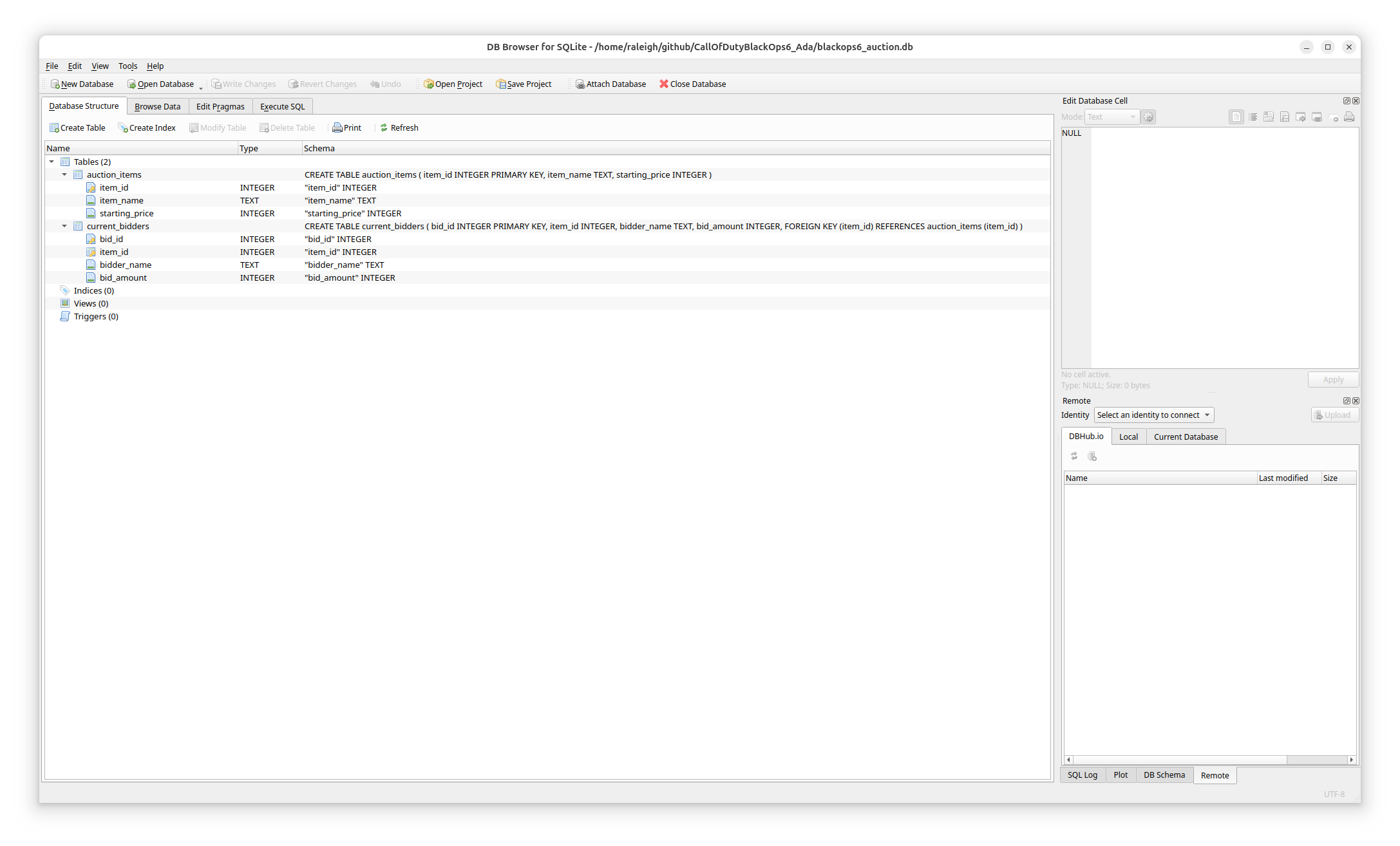
If you click on the “Browse Data” tab, you should see the actual tabular view (click on the ‘Table’ dropdown to switch between tables).
Then, click on the far-right tab called “Execute SQL”.
Either type in the SQL query from the screenshot, or copy it from above.
You should see the same result as in the screenshot, and the log should show:
Execution finished without errors.
Result: 5 rows returned in 1ms
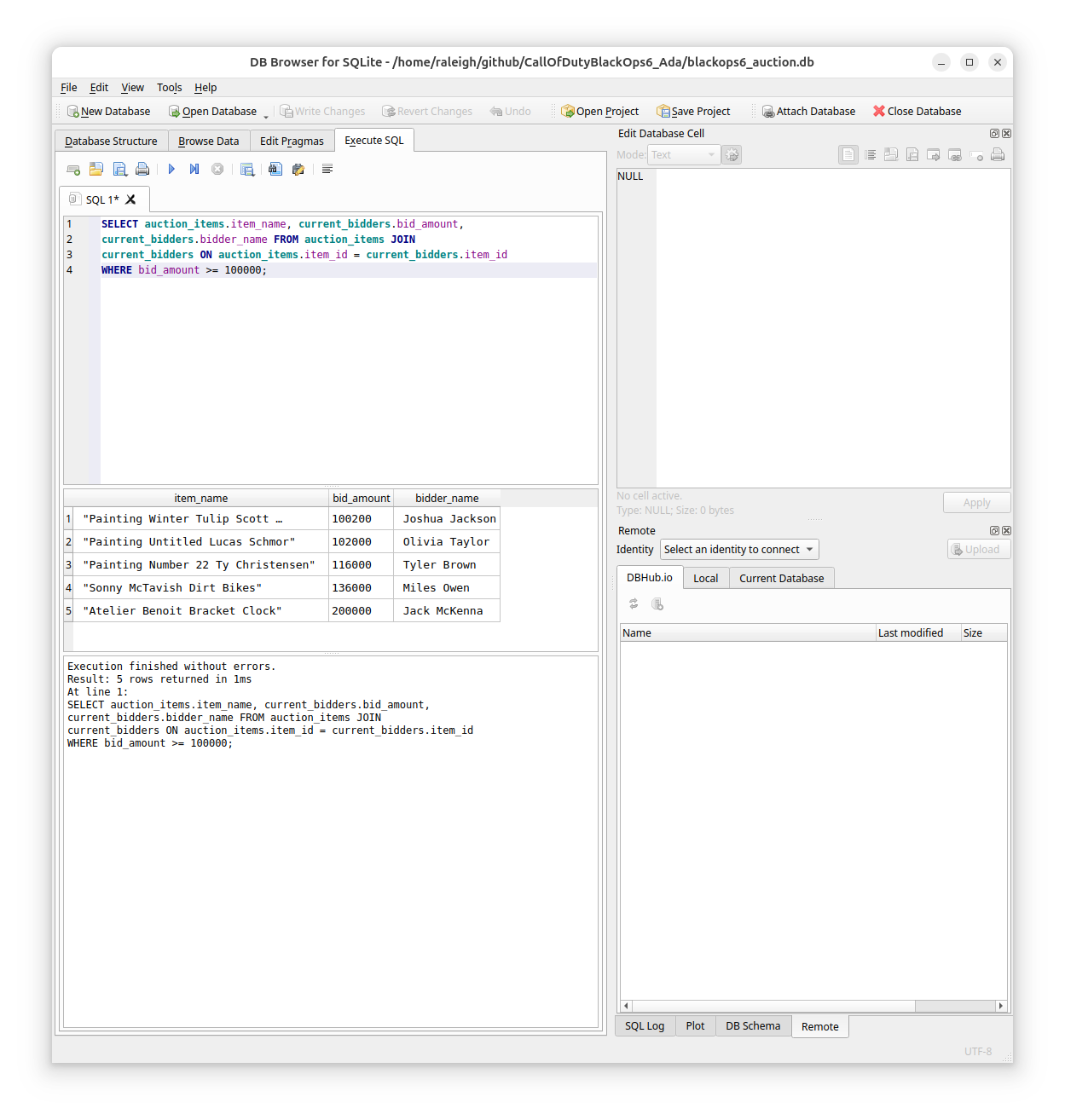
The only difference in our version and the game’s is that they have the item id included in the name, we do not.
Leave a comment